

Best 10 Wedding AI Prompts for Men’s Elegant Groom Portraits and Candid Moments
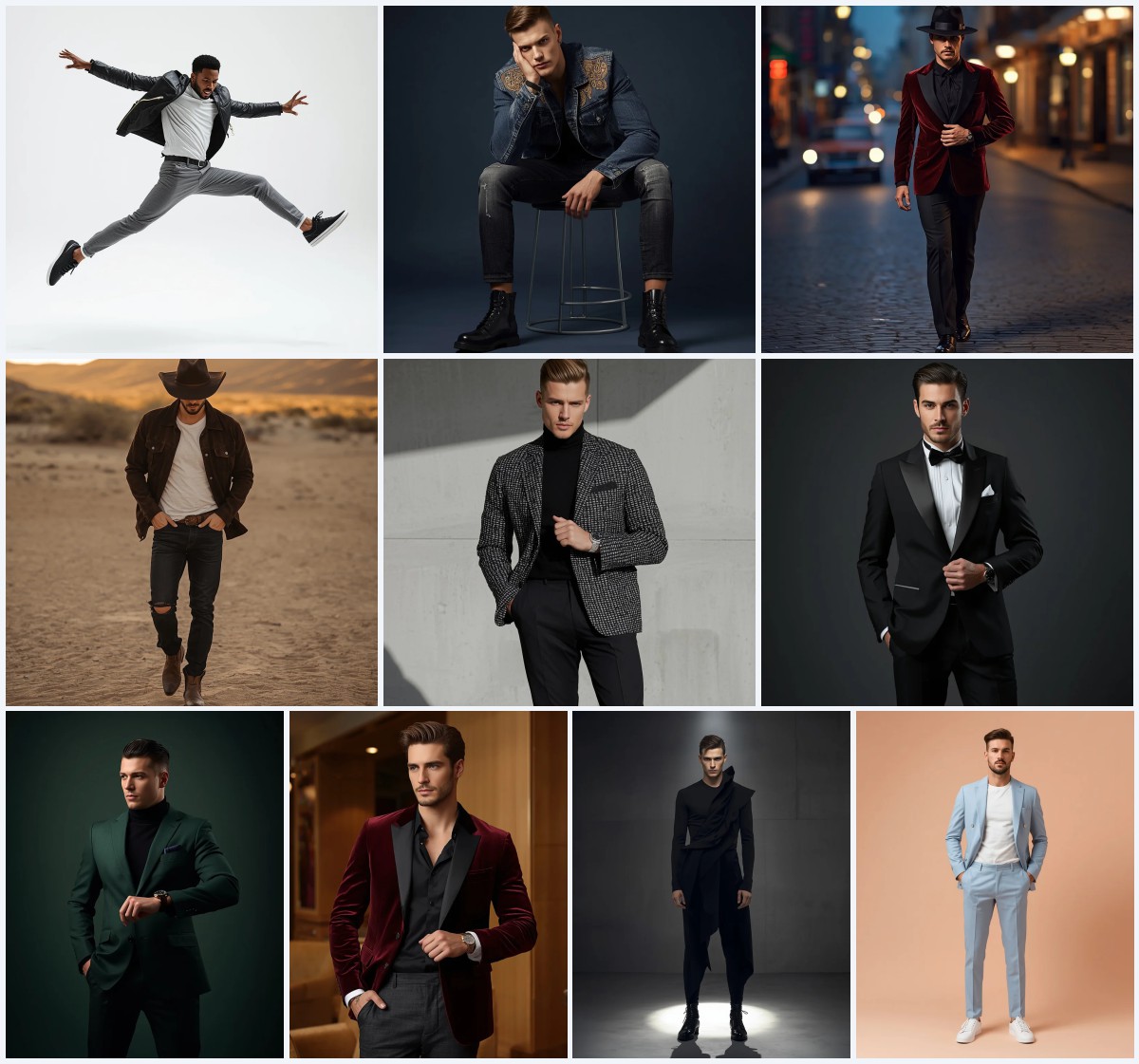
Wedding photography is a significant part of any couple's journey, and capturing the groom in the right light is just as important as the bride. This collection of ten prompts focuses specifically on men's fashion and portraiture, offering a range of styles from formal evening wear to rugged, candid settings. Whether you are looking for a polished studio shot or a dynamic action pose, these prompts provide the structural details needed to generate high-quality images.
The set includes both single-image prompts and multi-frame collages, giving you flexibility in how you present your final output. Each prompt is designed to highlight specific textures, lighting conditions, and poses that define modern masculine elegance. By using these carefully crafted descriptions, you can create visuals that feel authentic, stylish, and ready for social media or personal keepsakes.
What this wedding men's portrait collection is asking for
This collection asks for a diverse range of male portraits that emphasize elegance, confidence, and texture. The prompts move beyond simple headshots to include full-body stances, close-up profiles, and dynamic motion shots. The core requirement is photorealistic rendering with high resolution, ensuring that every detail from fabric weave to facial hair is visible and crisp.
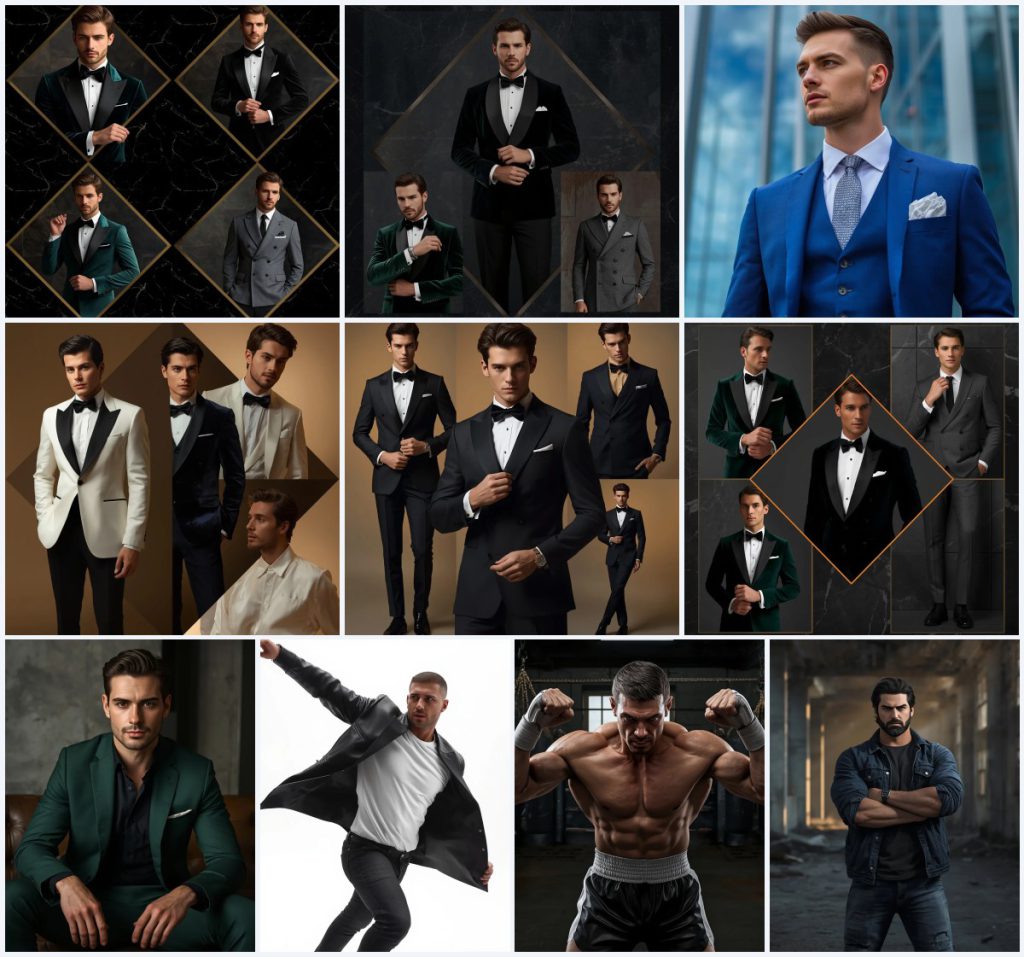
- Deep emerald velvet blazers and black silk-lapel tuxedos for formal evening looks.
- Sharp royal blue three-piece suits paired with textured silver ties.
- Designer white tuxedo jackets and navy blue velvet blazers for party wear.
- Modern forest green tailored suits with clean black dress shirts.
- Black leather jackets over crisp white t-shirts for a rugged, edgy style.
- Gritty boxing gym attire including athletic shorts and hand wraps.
Scenes and settings across the ten prompts
The settings vary significantly to match the mood of each outfit. Some prompts place the subject in a "minimal dark marble wall" background, which provides a neutral, luxurious backdrop that lets the clothing colors pop. Others use a "modern steel-and-glass skyscraper" to create an urban, professional atmosphere where reflections play a key role in the composition.
For more casual or intense moods, the scenes shift to a "luxury concrete loft" or a "gritty boxing gym." In the warehouse scene, the prompt specifies "crumbling concrete walls, broken windows, and shafts of dusty, golden light filtering through," creating a dramatic, moody environment that contrasts with the subject's serious expression. These varied backgrounds ensure that no two images look alike, offering a complete visual narrative of the groom's style.
Why these prompts work for wedding and lifestyle content
These prompts are effective because they balance fashion detail with emotional resonance. They do not just describe clothes; they describe how the man interacts with his environment and the camera. This approach helps AI models generate images that feel like real photographs rather than stiff illustrations.
- They specify exact lighting types, such as "rich cinematic lighting" or "high-key lighting," which are crucial for defining mood and depth.
- They include specific camera angles and lenses, like "85mm lens" and "wide-angle motion shot," to guide the perspective and focal length.
- They focus on micro-details like "adjusting cuffs" and "short, edgy haircut," which add authenticity and character to the subject.
Three distinct visual styles in this set
There are three primary styles represented in this collection: the premium collage format, the sharp editorial portrait, and the gritty action shot. Each style serves a different purpose, from showcasing multiple outfits to highlighting a single powerful moment. Understanding these distinctions helps you choose the right prompt for your specific needs.
- Premium Collage: Uses diamond-cut patterns to display multiple outfits in one frame, ideal for showing variety.
- Editorial Portrait: Focuses on a single subject with sharp details and professional lighting, perfect for main gallery shots.
- Gritty Action: Captures dynamic movement and raw emotion in environments like gyms or warehouses, adding intensity.
How to use these prompts effectively
To get the best results, follow a structured workflow that ensures consistency and quality. Start by selecting the specific prompt that matches the vibe you want, then prepare your reference materials if you are using image-to-image features. Pay close attention to the generation process, adjusting parameters as needed to refine the output.
- Copy Prompt. Select the desired text from the list above and copy it into your clipboard.
- Upload Reference. If available, upload a photo of the groom or a similar model to guide the face and body structure.
- Generate Image. Paste the prompt into your chosen AI tool and initiate the generation process.
- Check Hands. Inspect the generated hands for extra fingers or unnatural positioning, especially in cuff-adjusting poses.
- Verify Face. Ensure the facial features match the intended identity and that expressions look natural, not distorted.
- Review Main Object. Confirm that the suit, jacket, or other key clothing items are rendered correctly without missing buttons or seams.
Choosing the right reference photo
When using a reference image, clarity and lighting are paramount. The AI uses this photo to understand the subject's unique features, so a low-quality input will lead to inconsistent outputs. Select photos that align with the specific lighting and angle described in the prompt for the best fusion of identity and style.
- Use a high-resolution photo with clear facial features and minimal obstruction.
- Ensure the lighting in the reference photo is even, avoiding harsh shadows that might confuse the AI.
- Choose a pose that loosely matches the prompt, such as a direct gaze for portrait prompts or a side profile for close-ups.
Best tools for generating these wedding portraits
Different AI platforms handle complex fashion and human anatomy differently. Below is a comparison of four popular tools, highlighting their access levels, typical realism, and specific utility for this collection of prompts.
| Tool | Access | Typical Realism | Useful here for |
|---|---|---|---|
| ChatGPT | Free/Paid | Moderate | Generating conceptual layouts and editing text descriptions for clarity. |
| Google Gemini | Paid | High | Handling complex multi-frame collages with consistent character identity. |
| Leonardo AI | Freemium | Very High | Rendering ultra-realistic textures like the deep emerald velvet blazer mentioned in the prompts. |
| Midjourney | Paid | Artistic/Realistic | Creating cinematic lighting effects and dramatic compositions for the gritty urban scenes. |
Tips for refining the final output
Even with a good prompt, minor adjustments can make a big difference. Focus on the specific materials and objects mentioned in the text to enhance the realism of the image. These small tweaks help bridge the gap between digital generation and photographic reality.
- Emphasize the texture of the 'textured silver tie' by adding keywords like 'woven detail' or 'metallic sheen.'
- For the 'black leather jacket,' request 'matte finish' or 'glossy highlights' to better define the material under the specified lighting.
- In the boxing gym prompt, specify 'visible sweat droplets' on the skin to enhance the sense of physical exertion and realism.
Common issues and how to fix them
AI generation can sometimes produce artifacts or inconsistencies, particularly with complex clothing and human anatomy. Being aware of these common problems allows you to quickly identify and correct them during the post-processing phase or by regenerating with adjusted parameters.
| Issue | What to change |
|---|---|
| Distorted hands while adjusting cuffs | Add negative prompts for 'extra fingers' or 'deformed hands' and simplify the pose description. |
| Inconsistent suit color across frames | Specify the exact hex code or name (e.g., 'royal blue') repeatedly in the prompt to maintain consistency. |
| Blurry background details in skyscraper scenes | Increase the resolution setting or add 'sharp focus' and 'high definition' to the background description. |
| Unnatural facial expressions | Refine the emotion descriptor from 'serious' to 'confident calm' to avoid grimacing or tension lines. |
Frequently Asked Questions
Can I use these prompts for commercial wedding portfolios?
Yes, most AI-generated images can be used commercially, but you should check the specific terms of service of the AI platform you are using to ensure compliance with copyright and usage rights.
Which prompt is best for a traditional wedding invitation?
The 'Sophisticated Men In Velvet Blazers Modern Luxury Portrait' prompts are ideal for invitations due to their elegant, timeless aesthetic and high-resolution output suitable for print.
Do I need a reference photo to use these prompts?
No, you can generate images without a reference photo, but using one will help maintain a consistent likeness of the groom across multiple images in the collection.
Conclusion
This collection of ten wedding AI prompts offers a versatile toolkit for creating stunning male portraits. From the refined elegance of velvet blazers to the raw intensity of a boxing gym, each prompt captures a different facet of modern masculinity. By following the tips and workflows provided, you can generate high-quality, photorealistic images that serve as beautiful keepsakes or engaging social media content. Experiment with the different styles and settings to find the perfect match for your unique story.
Remember to always respect the privacy and consent of the individuals whose photos you edit or generate.