

Best 10 Beautiful Girl’s AI Prompts for Aesthetic Fashion Photography with Dreamy Outdoor Settings
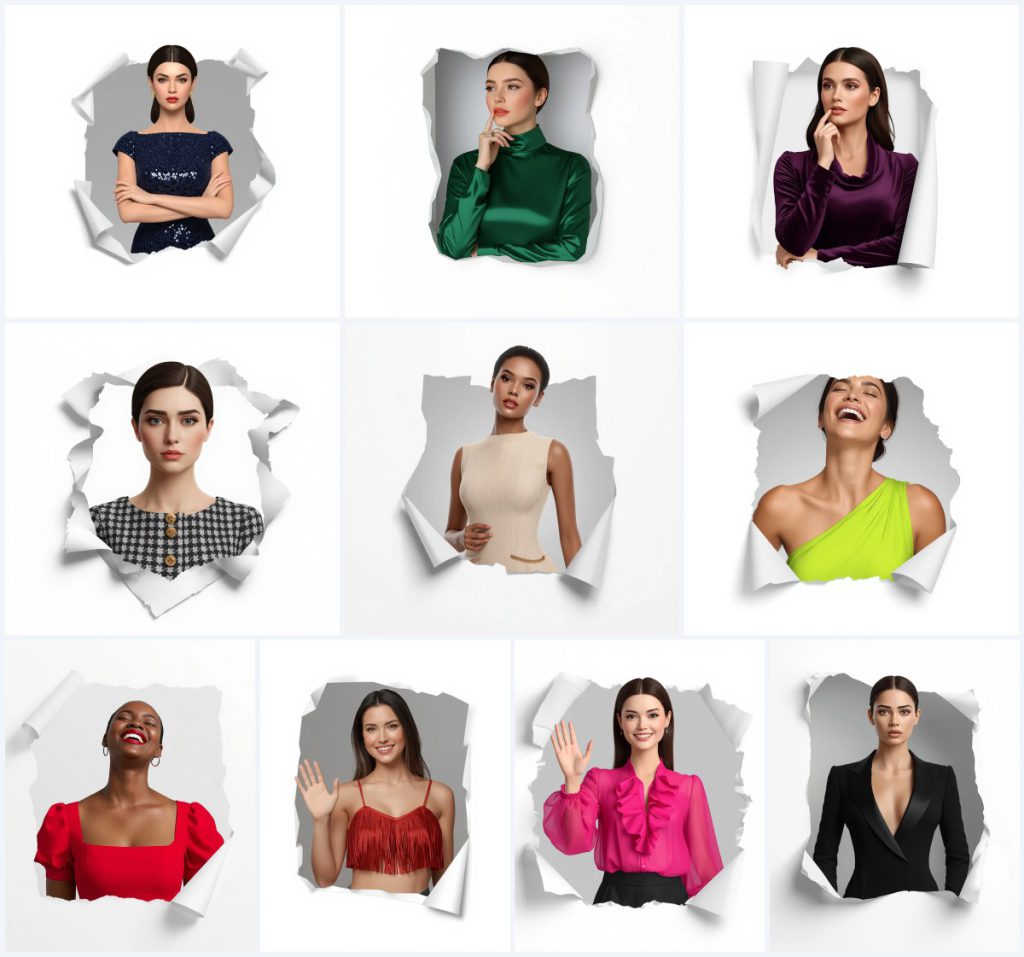
This collection offers ten distinct variations of a single, highly structured visual concept: a beautiful woman emerging from a torn paper hole. Each prompt focuses on a different outfit and emotional expression, ranging from a calm woman in a midnight blue gown to a joyful woman laughing in a chartreuse cocktail dress. The shared framework ensures consistency across the set, making it ideal for creators looking to produce a cohesive series of aesthetic fashion portraits.
The core mechanic of these prompts relies on the "torn paper" effect, where the subject appears to pop out of a physical sheet into the viewer's space. This creates a striking 3D illusion against a clean white background. By varying only the clothing color, fabric type, and facial expression, you can generate a diverse portfolio while maintaining a unified artistic style.
What this aesthetic fashion photography collection is asking for
These prompts request a high-resolution, polished 3D render that mimics professional studio photography. The key requirement is the maintenance of identical facial identity across all frames, ensuring the character feels consistent despite changes in attire. The visual focus is on the interaction between the subject and the paper texture, creating a tactile sense of depth.
- A realistic, ripped paper edge wrapping around the woman's half-body
- A subtle light grey gradient inside the torn paper hole
- Soft studio lighting with no harsh shadows or smooth highlights
- A single cool, crisp pure white background locked without color shift
- A chest-up framing within a 4:5 vertical aspect ratio
- Specific garment details like emerald satin, dark purple velvet, or black tweed
How the scene constructs a 3D popping-out effect
The visual narrative begins with the phrase "avatar appears to emerge through a torn paper hole." This instruction directs the AI to treat the paper not just as a background element but as a physical barrier being breached by the subject. The text specifies "realistic, ripped edges wrapping naturally around her half-body," which adds necessary geometric complexity to the image.
Inside this breach, the environment shifts to a "subtle light grey gradient," providing a neutral canvas that contrasts with the vibrant colors of the dresses. The prompt emphasizes a "palpable 3D popping-out effect," urging the model to prioritize depth cues such as shadowing under the paper flaps and the curvature of the torn fibers.
Why this specific composition works for social media
This format is particularly effective for digital platforms because it combines elegance with a modern, graphic design twist. The simplicity of the white background ensures that the viewer's attention remains fixed on the subject's face and the texture of the clothing. It avoids the clutter often found in outdoor or lifestyle shots, offering a clean, premium look.
- High contrast between the colorful garments and the stark white background
- Unique 3D perspective that stands out in a feed of flat images
- Consistent framing that allows for easy grid layout organization
Three styles embedded in these prompts
There are three primary stylistic elements at play here: hyper-realism, studio minimalism, and surreal collage. Hyper-realism is achieved through the demand for "sharp, polished" rendering and detailed skin textures. Studio minimalism is defined by the "single cool, crisp pure white" backdrop and controlled lighting. Surreal collage emerges from the impossible physics of a person breaking through a 2D surface into 3D space.
- Hyper-Realism: Focuses on "identical facial identity" and "smooth highlights" to mimic real skin and fabric.
- Studio Minimalism: Uses a "locked" white background and "even and clean" lighting to remove distractions.
- Surreal Collage: Creates a "palpable 3D popping-out effect" using "ripped edges" as a frame.
Step-by-step guide to generating these portraits
To achieve the best results, follow a systematic approach that prioritizes reference consistency. Since the prompts emphasize identical facial features, using a reference image is crucial if you want a specific person. Start by preparing your workspace and then move through the generation process carefully, checking each output for anatomical correctness before moving to the next variation.
- Copy the Prompt. Select one of the ten prompts and copy the full text into your AI tool's input field.
- Upload Reference. If using a specific face, upload a clear, front-facing photo of the subject to maintain identity.
- Generate Image. Click generate and wait for the initial batch of four images to appear.
- Check Hands. Zoom in on any visible hands to ensure fingers are correctly formed and not fused.
- Check Face. Verify that the facial features match the reference and that the expression matches the prompt (e.g., 'laughing' vs 'calm').
- Check Main Object. Inspect the torn paper edges to ensure they look realistic and wrap correctly around the body.
Choosing the right reference photo
The quality of your output depends heavily on the reference material you provide. Because the prompt requires a "chest-up" view, your reference should ideally be a portrait that shows the shoulders and upper torso. This helps the AI understand how the clothing drapes over the body relative to the face.
- Use a high-resolution image with good lighting to avoid noise in the final render
- Ensure the face is clearly visible and not obscured by hair or accessories
- Select a photo where the subject is looking directly at the camera for better eye contact in the result
Which AI tools handle this prompt best
Different platforms interpret complex spatial instructions differently. Some excel at the 3D depth of the paper tear, while others are better at maintaining facial consistency. Below is a comparison of four popular tools and their suitability for this specific aesthetic fashion photography collection.
| Tool | Access | Typical realism | Useful here for |
|---|---|---|---|
| ChatGPT | Web/Mobile | Moderate | Generating descriptive variations of the "torn paper hole" concept. |
| Google Gemini | Web/App | High | Maintaining "identical facial identity" across multiple generations. |
| Leonardo AI | Web | Very High | Rendering "realistic, ripped edges" with fine texture detail. |
| Midjourney | Discord/Web | Artistic/High | Achieving the "soft studio lighting" and "pure white" background purity. |
Tips for perfecting the fabric and paper details
Since the prompt varies significantly based on the material of the dress, paying attention to fabric-specific keywords will improve the realism. For example, satin behaves differently than velvet or chiffon. Adjusting your expectations or adding minor modifiers can help the AI distinguish between these textures effectively.
- For the "Emerald Green Satin Dress," add "high sheen" to emphasize the reflective quality of the fabric.
- For the "Dark Purple Velvet Gown," use "deep pile" to capture the soft, light-absorbing nature of velvet.
- For the "Hot Pink Chiffon Blouse," include "translucent layers" to show the lightweight, flowing movement of the material.
Common issues and how to fix them
Even with precise prompting, AI can struggle with complex intersections between organic shapes (the body) and rigid objects (the paper). Here are four common failures you might encounter and how to address them in your next iteration.
| Issue | What to change |
|---|---|
| Paper edges blend into the skin | Add "distinct separation" or "clear boundary" between the paper and the body. |
| Facial identity shifts between frames | Increase the weight of the reference image or use an ID-preserving plugin. |
| Background shows unwanted gradients | Reiterate "locked pure white" and add "no shadows on background". |
| Hands have extra fingers | Regenerate specifically focusing on hand anatomy or crop the image to hide hands if unnecessary. |
Frequently Asked Questions
Can I use these prompts for commercial purposes?
Yes, provided you adhere to the terms of service of the specific AI platform you are using. Most major platforms allow commercial use of generated images, but always check their latest licensing agreements.
Why is the aspect ratio specified as 4:5?
The 4:5 ratio is optimal for Instagram posts and many social media feeds. It provides a vertical portrait orientation that fits well on mobile screens without excessive cropping.
Do I need to edit the images after generation?
While the prompts aim for "ultra-clean" results, minor touch-ups in post-production can enhance the sharpness of the paper edges or adjust color balance to make the dresses pop even more.
Conclusion
This collection of ten prompts provides a versatile toolkit for creating striking, modern fashion portraits. By leveraging the unique "torn paper" aesthetic, you can produce a series of images that are both visually engaging and technically impressive. Whether you choose the calm elegance of the midnight blue gown or the playful energy of the cherry red fringe top, the consistent framework ensures a professional finish. Experiment with the different fabrics and expressions to find the combination that best suits your creative vision.
Remember that you hold the rights to edit and refine any photo you generate, allowing you to tailor the final output to your exact brand standards.